Office based roles often involve prolonged computer use across multiple applications, documents, and screens. Traditional flat mice rotate the forearm inward, increasing tension across the wrist and elbow over time.
Vertical mice position the hand in a more natural handshake orientation, helping reduce forearm pronation and encouraging a more neutral wrist posture. This can support comfort across long working sessions and reduce fatigue associated with repetitive clicking and scrolling.
This guide focuses on vertical mice designed to improve efficiency, comfort, and workflow consistency in professional environments.
Quick Comparison Table
| Mouse | Buttons | Connectivity | Price Range |
|---|---|---|---|
| Logitech MX Vertical | 4 | Wireless | £80–£95 |
| Evoluent VerticalMouse 4 | 5 | Wired/Wireless | £90–£110 |
| Kensington Pro Fit Ergo | 2 | Wireless | £45–£60 |
| Anker Wireless Vertical | 2 | Wireless | £25–£35 |
| Trust Verto Vertical | 2 | Wired | £25–£35 |
1. Logitech MX Vertical
The Logitech MX Vertical is widely recognised for its refined ergonomic shape and high build quality. Its 57 degree angle promotes natural wrist positioning while maintaining excellent precision for detailed work.
Customisable buttons allow workflow optimisation across applications, supporting productivity throughout the working day.
Suitable for:
• long office work sessions
• spreadsheet and document workflows
• multi device users


2. Evoluent VerticalMouse 4
The Evoluent VerticalMouse offers a fully upright design that supports neutral wrist alignment. Its additional programmable buttons allow users to assign shortcuts that reduce repetitive cursor movements.
The extended body provides strong palm support for consistent comfort.
Suitable for:
• high workload environments
• detailed digital tasks
• users wanting maximum vertical positioning


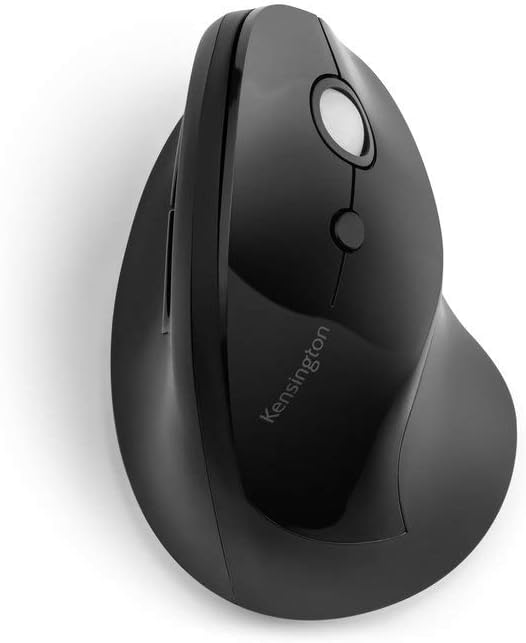
3. Kensington Pro Fit Ergo Vertical Mouse
The Pro Fit Ergo provides a slightly softer vertical angle, making it easier to transition from a traditional mouse. Its shape supports natural finger placement without requiring grip adjustment.
Reliable wireless connectivity ensures consistent performance in busy work environments.
Suitable for:
• general office productivity
• users new to ergonomic mice
• moderate daily use


4. Anker Wireless Vertical Mouse
The Ankler Wireless is a widely used entry level ergonomic mouse that provides meaningful wrist positioning improvements at an accessible price point. Its lightweight design allows easy movement across the desk while maintaining ergonomic benefits.
Suitable for:
• entry level ergonomic upgrades
• home offices
• administrative tasks


5. Trust Verto Vertical Mouse
The Trust Verto offers a simple ergonomic design that supports neutral wrist positioning during daily computer use. Its textured finish improves grip stability across longer working sessions.
A practical option for users wanting ergonomic improvements without premium pricing.
Suitable for:
• everyday office use
• budget friendly upgrades
• simple workstation setups


Buying Guide: Improving Workplace Comfort
Office workflows often involve repetitive clicking, scrolling, and pointer movement. Improving wrist alignment can reduce muscular fatigue across extended periods of computer use.
Key considerations:
vertical angle of the device
ease of button access
cursor precision
compatibility with multi screen setups
Reducing forearm rotation may help improve comfort consistency throughout the working day.
Frequently Asked Questions
Do vertical mice improve productivity?
Improved comfort can support more consistent workflow by reducing fatigue associated with prolonged mouse use.
How long does it take to adjust?
Most users adapt within a few days. Initial movement differences typically feel natural after short use.
Are vertical mice suitable for all office tasks?
Yes. Modern vertical mice support precision control across spreadsheets, documents, browsing, and design applications.