For individuals experiencing RSI, chronic wrist discomfort, or persistent forearm strain, reducing movement demand can significantly improve comfort. Traditional mice require repeated arm and wrist motion throughout the day, which may aggravate symptoms over time.
Trackball mice provide an alternative approach. Instead of moving the device across the desk, the cursor is controlled by rotating a stationary ball using the thumb or fingers. This reduces the repetitive motion typically associated with standard mouse use.
This guide highlights trackball mice that prioritise comfort, precision, and reduced physical effort across long working sessions.
Quick Comparison Table
| Mouse | Control Type | Connectivity | Price Range |
|---|---|---|---|
| Logitech MX Ergo | Thumb | Wireless | £90–£110 |
| Kensington SlimBlade | Finger | Wired | £95–£120 |
| Elecom Huge | Finger | Wired/Wireless | £55–£75 |
| ProtoArc EM01 | Thumb | Wireless | £35–£50 |
| Logitech M575 | Thumb | Wireless | £45–£60 |
1. Logitech MX Ergo
The MX Ergo is one of the most widely recommended trackball mice for long term comfort. The adjustable hinge allows the device to tilt slightly, improving forearm positioning and reducing muscular tension.
Thumb based cursor control significantly reduces the need for wrist movement, making it suitable for users experiencing repetitive strain symptoms.
Suitable for:
• chronic wrist discomfort
• limited desk space
• productivity focused workflows


2. Kensington SlimBlade
The SlimBlade uses a centrally positioned trackball controlled by the fingers rather than the thumb. This distributes movement demand across multiple fingers, reducing repetitive strain on any single joint.
The twist scrolling feature also allows intuitive navigation through long documents.
Suitable for:
• precision tasks
• design workflows
• users preferring finger control


3. Elecom Huge Trackball Mouse
The Elecom Huge provides a large hand support area, allowing the palm to rest comfortably during use. Its multiple programmable buttons reduce the need for repetitive cursor movement.
The large trackball supports smooth control with minimal physical effort.
Suitable for:
• larger hands
• complex workflows
• extended daily computer use


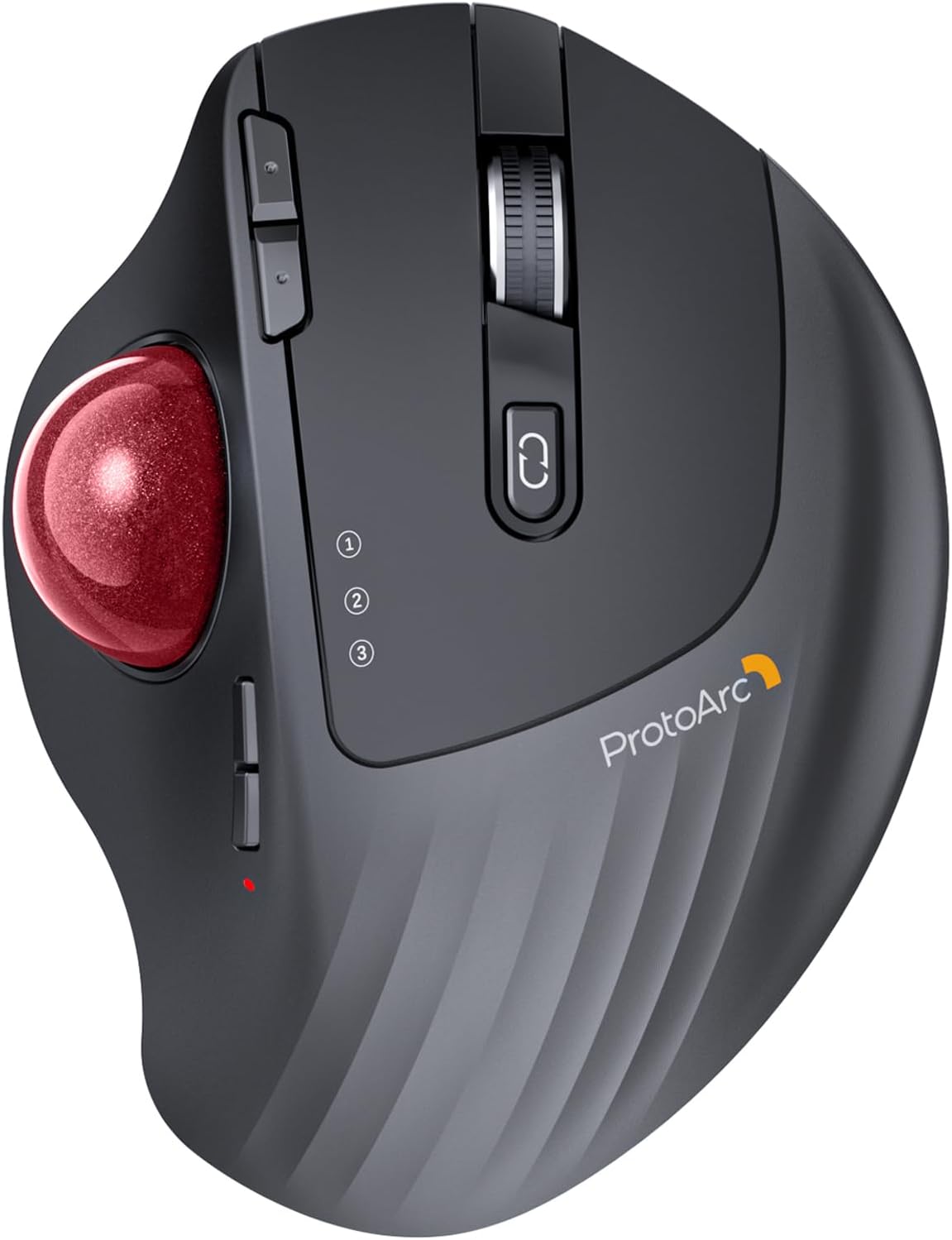
4. ProtoArc EM01 Trackball Mouse
The ProtoArc EM01 is a modern, budget friendly trackball that maintains ergonomic support without premium pricing. The removable trackball allows easy cleaning, ensuring consistent performance over time.
Its integrated wrist support helps maintain neutral positioning.
Suitable for:
• entry level ergonomic upgrades
• budget conscious buyers
• home office setups


5. Logitech M575 Trackball
The M575 provides a simple and highly reliable trackball design. It requires very little desk space and offers consistent performance across long working sessions.
Its compact shape makes it easy to adapt to for users transitioning from traditional mice.
Suitable for:
• smaller desk setups
• moderate daily use
• users new to trackballs


Buying Guide: Reducing Movement Demand
Trackball mice reduce the need to move the entire arm, which can significantly lower cumulative strain across the wrist and forearm.
Key considerations:
thumb vs finger controlled trackball
size of hand support area
button placement accessibility
ease of cleaning the trackball
Reducing total daily movement demand may help improve comfort during extended computer use.
Frequently Asked Questions
Are trackball mice good for RSI?
Trackball mice can reduce repetitive wrist movement, which may help minimise strain associated with prolonged computer use.
Is thumb or finger control better?
Thumb trackballs feel more familiar to most users. Finger trackballs often distribute movement demand more evenly.
Is there a learning curve?
Most users adapt within a few days. Cursor precision typically improves quickly with consistent use.